

Complete Guide to APA 7 referencing and formatting- Updated May 2026
APA referencing is one of the most widely adopted referencing format around the world. It is globally acknowledged for its clear structure and easy-to-follow guidelines. However, for first time users, APA 7th edition can be a bit tricky to navigate.
In the following blog, check out how our editor-in-chief, Abhijeet Rajkeins, and Mukti Sharma explain how to format a document in APA 7th edition, along with examples and basic formatting rules for in-text citations, reference list structure, and the common mistakes to avoid.
By the end of this article, you will have a simple and practical understanding of how to apply APA style effectively in your documents.
In case you still have any doubts, you can directly reach out to us for direct, one-on-one assistance on our whatsapp here.
How to format a document in APA 7th Edition with example:
Before you start writing, it is important to set up your document according to formatting guidelines.
Check out the example APA format document here.:
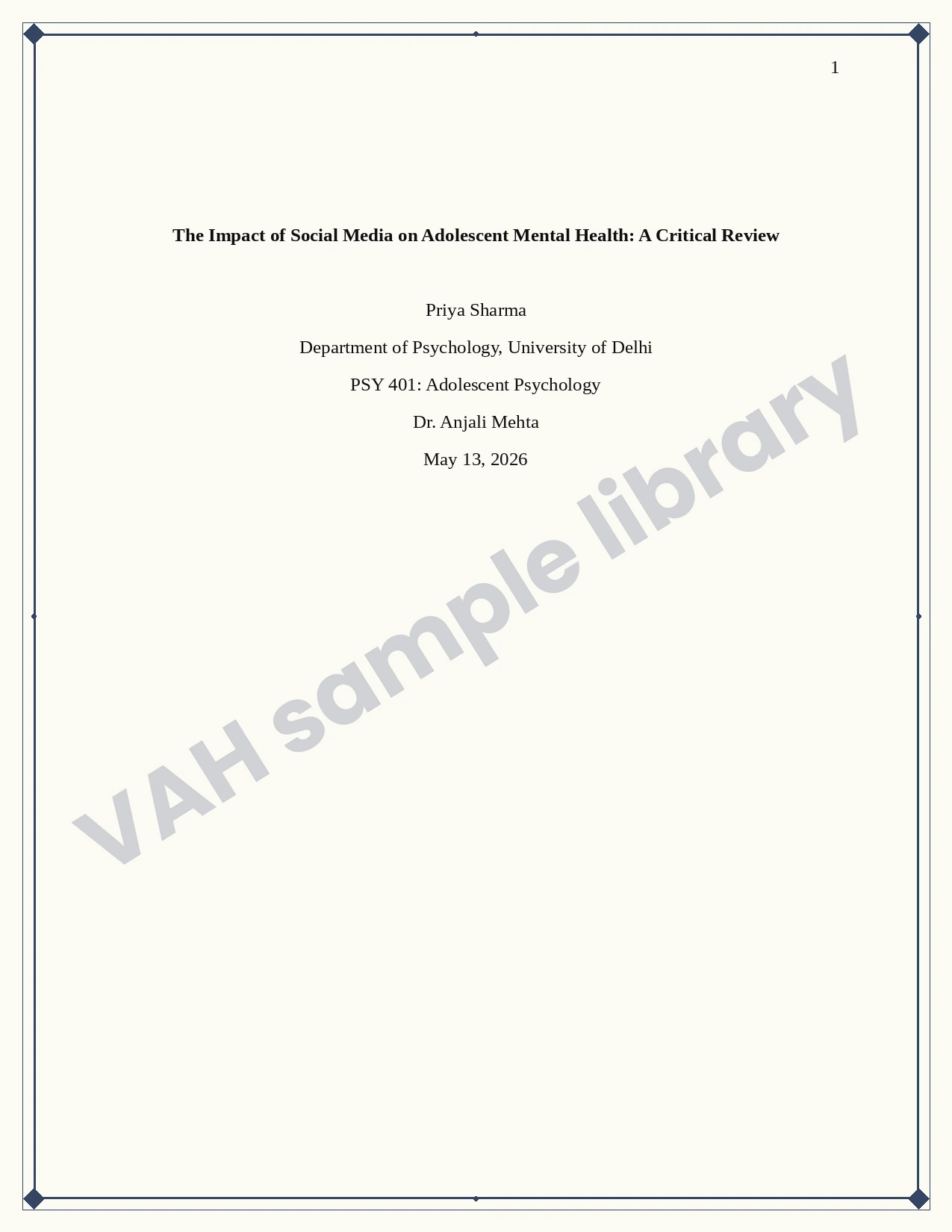
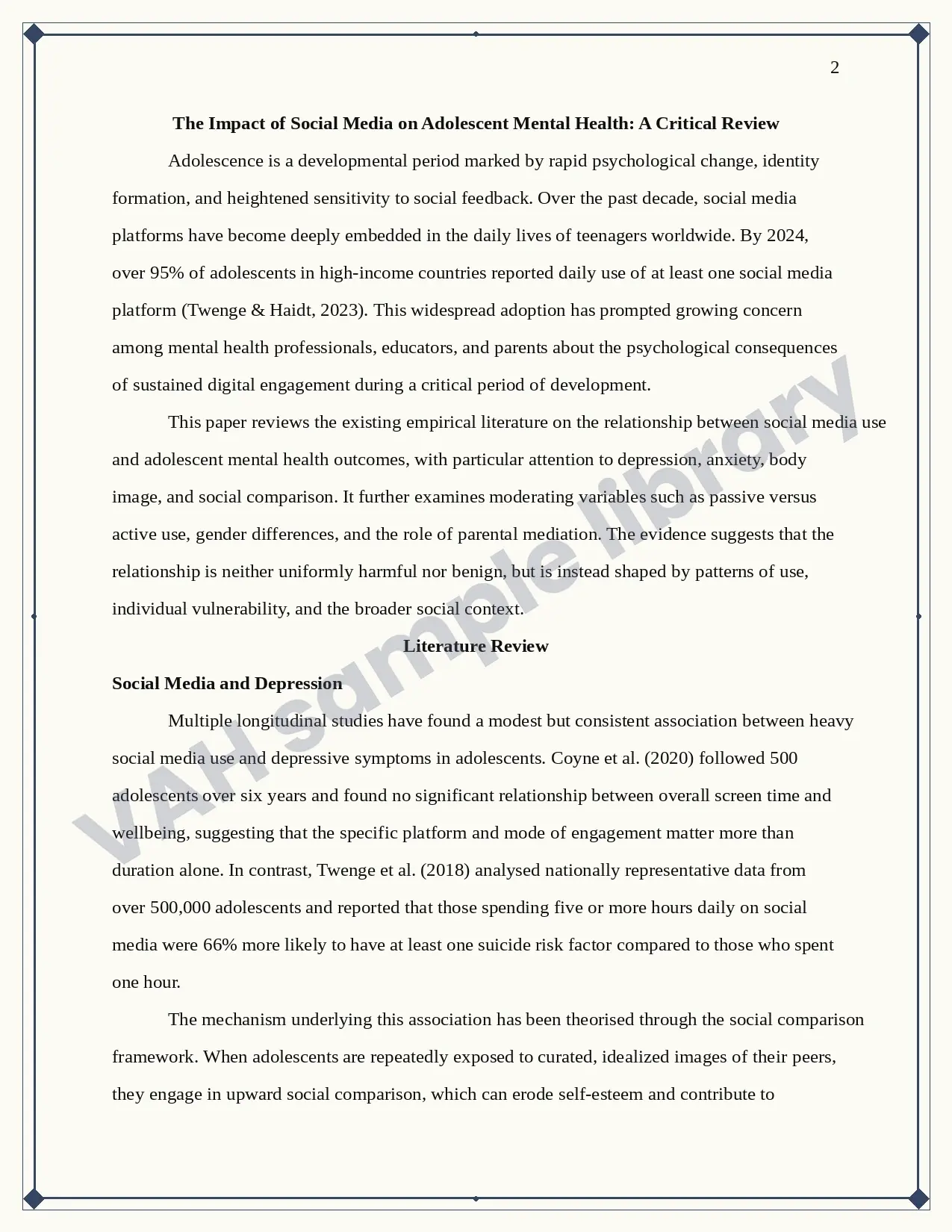
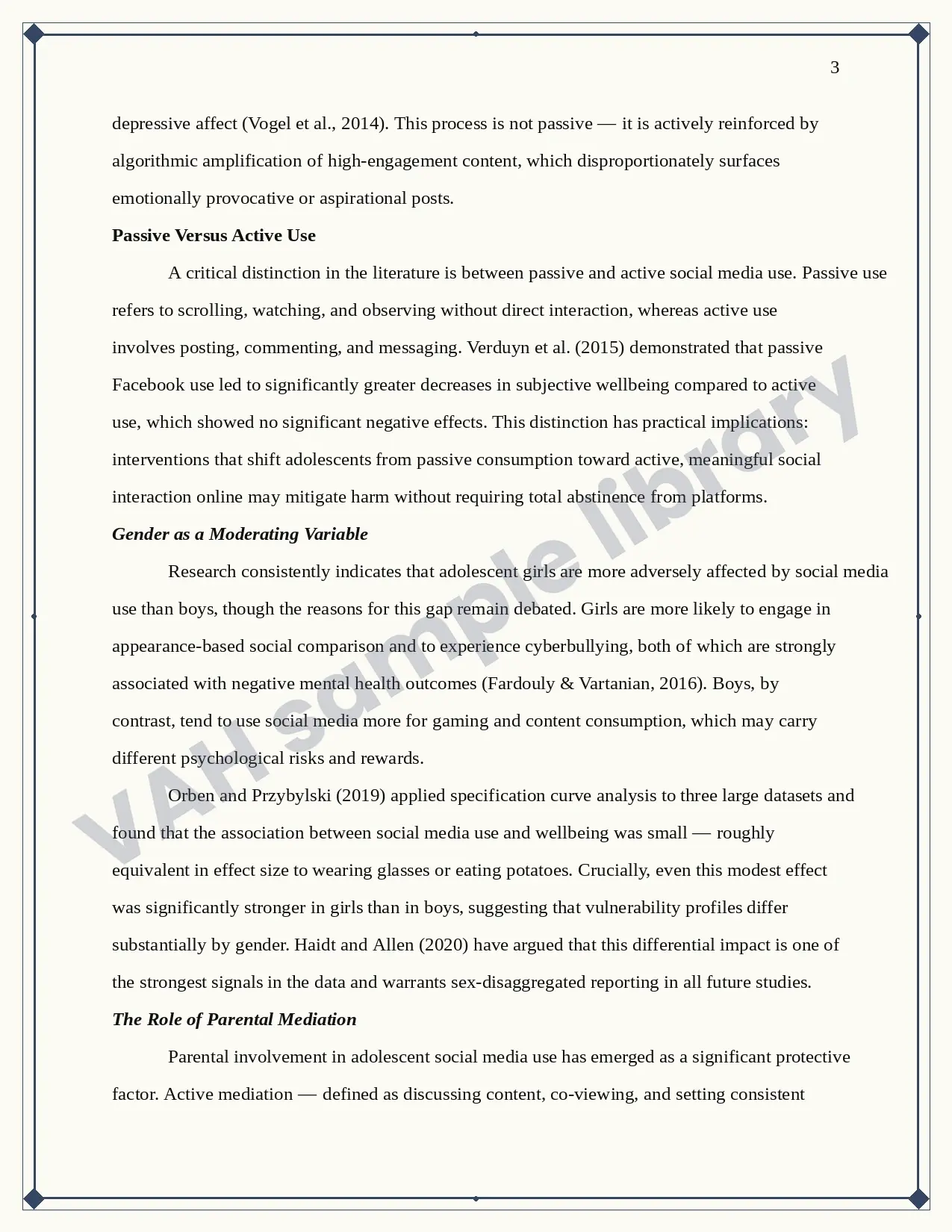
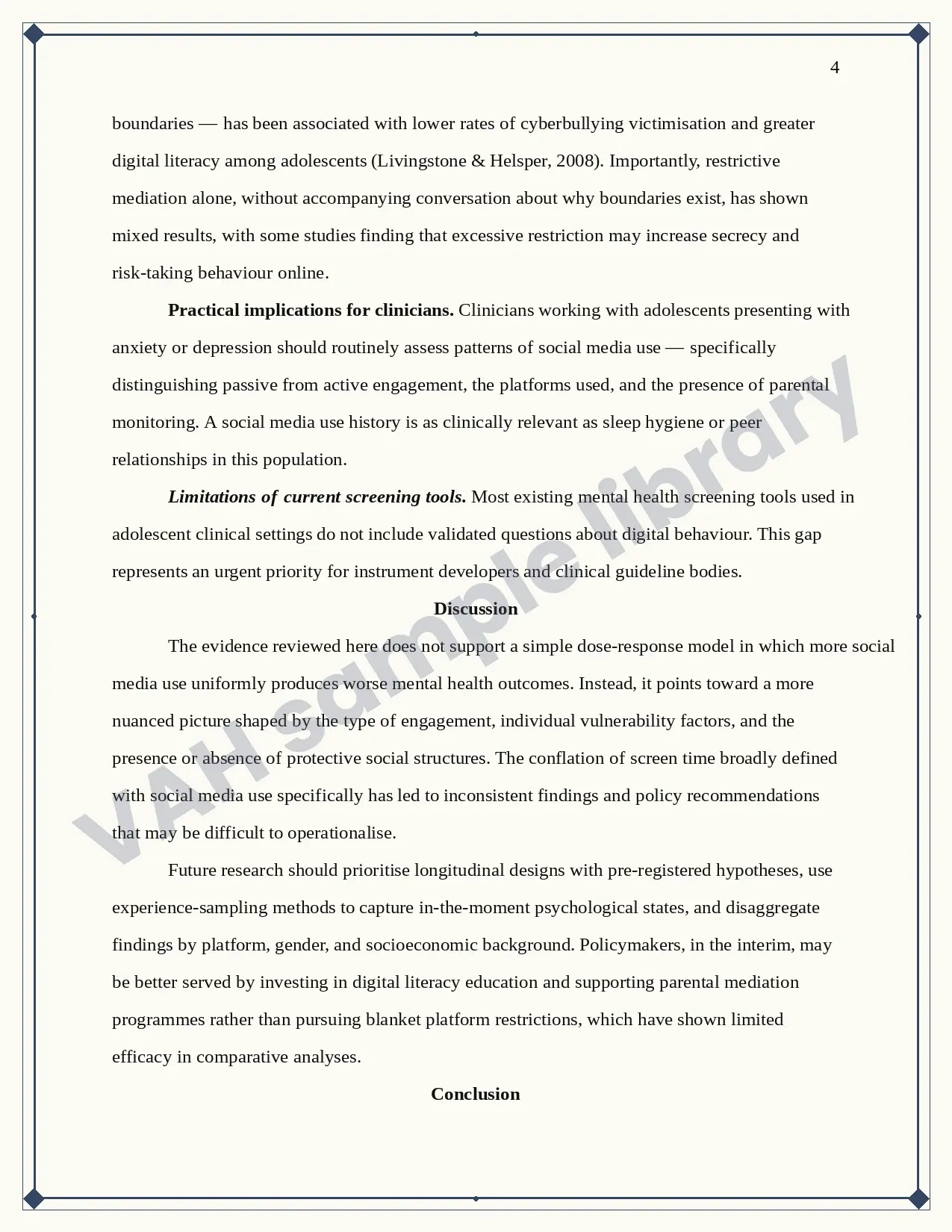
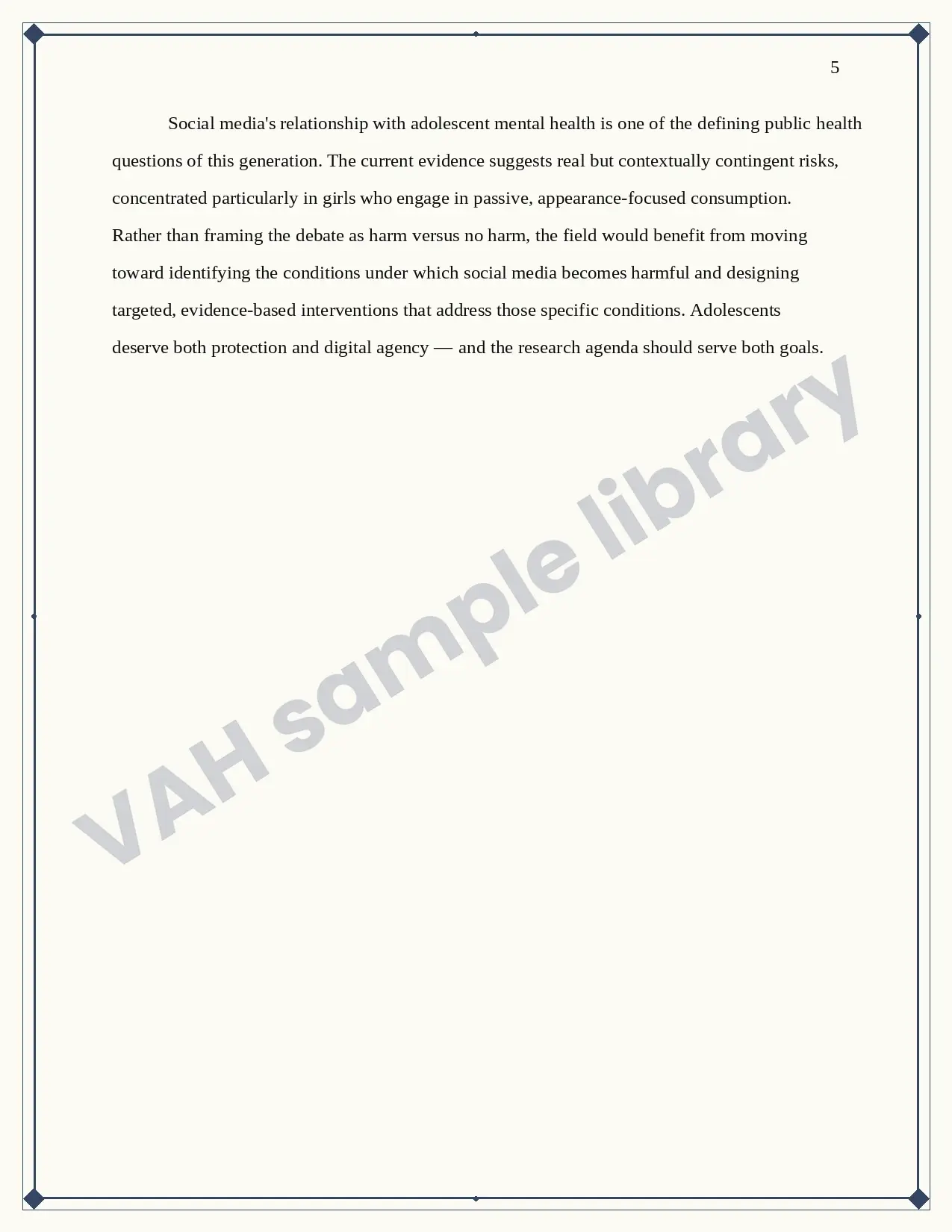
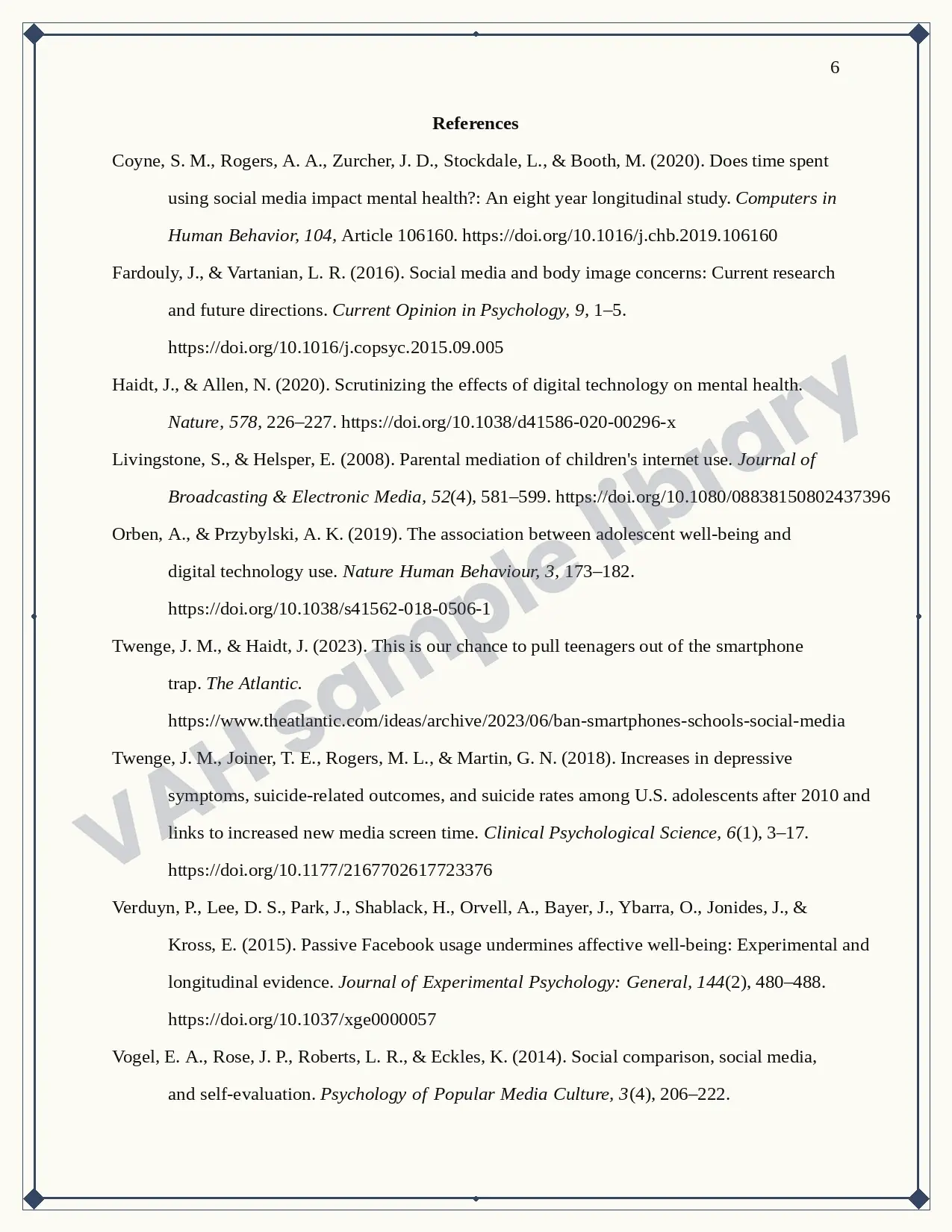
APA 7 edition has specific page setup and document formatting requirements, outlined below:
1. 1 Inch margin on all four sides: You can set it up by tapping on the margin section in the layout tab in MS Word. Choose ‘normal’ margins, which will automatically set 1” margin on each side.

2. Double line spacing: The entire document, from title page to the appendix section should be written with double line spacing. You can apply double line spacing in your document by navigating to the home section, then tapping on paragraph formatting, and then line and paragraph spacing. Choose 2.0 here. Your entire document will now have double line spacing.

3. 0.5” Paragraph indent: This is very important in APA 7 formatting, and many students lose marks here. The first line of every new paragraph must have a 0.5-inch indent, which simply means that the first line of your paragraph will start 0.5 inch away from the entire paragraph. To apply a 0.5-inch indent, click on the ‘Tab’ button on your keyboard. Your paragraph will now have a 0.5-inch indent.
For more detailed and updated guidelines, check our guide on APA 7 referencing rules and citation style.
4. Left Alignment: The entire document, including images, tables, and their titles, must be left-aligned, except for the title page and H1 headings. Many students keep their images and tables centre-aligned, just because it looks neater and more presentable, but this small mistake can cost you your marks, as APA 7 has strict criteria for image and table alignment. Everything must be left-aligned, including the text inside your table.

5. Page number on the top right corner in the header: Each page contains page number, including the title page. You can insert a page number by clicking on the ‘insert’ tab, tapping the header and footer, and choosing page number. This gives you multiple locations to insert the page number in the document. Choose ‘top of the document’ and then click ‘top right’. Your document will now have page numbers inserted in the header.

6. Running head (optional): In case you are submitting the manuscript for publication, then a running head containing the title of your manuscript must be inserted at the top left side of your document, on each page. Other students who are submitting papers in their college can skip this one as per APA 7 latest guidelines.

7. Approved Font style: Technically speaking, the American Psychological Association accepts Serif and Sans-Serif font styles only. For better readability, APA recommends Serif for printed documents and Sans-Serif for digital documents; they can still be used interchangeably.
Accepted Serif Fonts and their size as per APA 7:
- Times New Roman, 12-point (most widely used and recommended by VAH experts)
- Georgia, 11-point
- Computer Modern, 10-point
Accepted Sans-Serif fonts and their size as per APA 7:
- Calibri, 11-point (most widely used)
- Arial, 11-point
- Lucida Sans Unicode, 10-point
Bonus: Serif is derived from Dutch word schreef, meaning ‘line’ or ‘pen-stroke’. Serif fonts have small decorative strokes at the end of each character (such as Times New Roman), which gives them a formal and more traditional English-literature books appeal.
Sans-Serif (such as Arial), on the other hand, are simpler and cleaner fonts. They first started appearing in the early 19th century and were initially criticised for their rebellious approach, as they were considered ugly, and unrefined compared to traditional Times New Roman. It was considered so offensive that it was termed as ‘Gothic’ in its initial years. But with computers, Sans-Serif fonts have become more prominent as they are easier to read on a computer or a laptop.
8. Title Page: The American Psychological Association has a separate title page format for Professional papers and student papers. For student papers, include Paper title (bold, centered, title case, upper half of the page), followed by Author(s) name (centered, right below the title. DON’T USE titles, such as Prof, or Dr. here. While submitting your paper, you are simply Author), institutional affiliation (university name), Course name and number, instructor’s name, and due date (month day, year format). Include page number at the top right corner (sample example appended below).

9. Heading levels and their format:
- Heading 1: H1: Centre aligned, Bold, Title Case
- Heading 2: H2: Flush Left (it simply means sticking your text to the left-most corner of the document. Your heading starts just after a 1-inch margin), Bold, Title Case
- Heading 3: H3: Flush Left, Bold Italic, Title Case
- (For H1, H2, H3, your body paragraph starts from the next line, after you press enter.)
- Heading 4: H4: Indented by 0.5 inch, Bold Title Case, ends with Period. The body text starts right after the heading and NOT from the next line.
- Heading 5: H5: Indented by 0.5 inch, Bold Italic, Title Case, ends with period. Body text starts without pressing enter key.

VAH Expert Tip: If you are unable to locate any of these settings in your MS Word document, or are using other versions of MS Word, or similar text editors, such as Google Docs, or Mac OS, you can simply go to the search tab in your document, and look for the respective settings.

How to cite sources in-text and build an APA reference list:
Citing sources in the document:
For in-text citations, two different formats are followed- parenthetical and narrative format.

In parenthetical format, citations are added at the end of the referenced sentence.

In narrative citation, the in-text citation is added in between the sentence only, as demonstrated in the image above.
How to build an APA reference list:
In 2026, multiple online citation generation tools will be available to generate citations for you, where you simply have to insert the URL, and a well-formatted citation will be generated for you. However, these tools can make mistakes, and it is important to cross-check the generated citations to check for errors and ensure your marks are not deducted over negligence or lack of knowledge.
So, before submitting the document, go through the following checklist:
- Title: “References”- Bold, centre aligned and at the top of a new page. Always start at a new page. Never use ‘Biblography' as a heading. It must say ‘references’.
- Spacing: Double spacing for all entries
- Indent: Hanging indent (meaning, the first line starts from flush left and the remaining lines are indented by 0.5 inch.)
- Order for writing the references: All the references are arranged alphabetically by the author’s last name.
- The reference list is always written alphabetically as per the first author’s last name, and if the same author has two publications, then the older work is cited first.
- All the references follow a four-part formula- Author. (Date). Title. Source. Make sure your citations have these.
- Journal name and volume number are italicised. Issue numbers are not italicised.
- As per APA 7 edition, the URLs added in the references should be clickable.
What are the best tools for APA referencing?
In the previous section, we saw how to manually cite sources and identify the correct format. However, there are plenty of tools available to automate citation generation. Some of these tools are free of cost and are ideal for free citation management, while some are more advanced, professional citation management tools, which not only assist with generating a reference list, but are also helpful in managing the reference PDFs and documents, all in one place.
Free citation generation Tools: (login-free):
Full reference management tools:
- EndNote (Paid, best for institutional-level research) (VAH experts recommended)
- Zotero (Free and open Source) (browser extension)
- Mendeley (Free, recommended for PDF-based reference management)

Common student mistakes and queries answered in 2026:
Most common mistakes in APA 7 edition and how to avoid them:
Among all students who come to us, the most frequent query is in the domain of APA referencing and citation formats. It’s simply not because its rules are complicated, but because the majority of the guides and online articles explain what the format looks like and do not explain why you keep getting it wrong. So, in this section, we discuss some of the common student pain areas.
In 2025, the APA 7th ed knowledge test of 70 students was conducted, where it was found that the errors were not random and were clustered around three similar problems. They are listed below, and how to avoid these problems is also mentioned:
- Using ‘pp’ for page numbers: ‘pp’ is used when citing more than one page. If the reference is taken from a single page, only a single ‘p’ is written.
- Skipping page numbers during direct quotes: In case you mention a direct quote from an author, without changing it, it is put in quotation marks and is called direct quotes. For direct quotes, you must also mention the exact page number for the reference and the reference format is (Author, Year, p. X) and not (Author, Year) alone.
- The use of “et al.” for in-text citations for multiple authors: In APA guidelines, et al is used when the cited source has three or more than three authors. As per the latest APA guideline 2026, for a single author, write (Smith, 2020), for two authors, write (Smith & Jones, 2020), and for three or more authors, write (Smith et al., 2020).
I generated my citation from ChatGPT. Will it flag for Plagiarism?
Yes. If the citations are generated through ChatGPT, it will flag for plagiarism. LLM’s are not designed to generate citations. In fact, multiple studies have proved that in 51% of the cases, citations generated by LLMs, such as Claude, ChatGPT, and Grok AI, were non-existent or fabricated. For generating citations, you can adopt free tools such as Zotero, Mendeley, MyBib or switch to more advanced tools, such as EndNote for AI and plagiarism-free citations.
Are the bibliography and reference list the same? Which heading should I use for my references?
The bibliography and reference list are the same, but in APA referencing format, it is called references. DON’T write bibliography as your heading to references.
Disclaimer: all content and intellectual property remain the exclusive property of value Assignment Help







No Comments